

Using Omogen in Teamtailor
🧩 Chrome Extension — Omogen Connector
Open any Teamtailor job in Omogen with one click from your ATS. Install the extension →
Omogen integrates natively with Teamtailor via a trigger on your Kanban view. As soon as a candidate reaches the configured stage, Omogen contacts them automatically.
You have the option to work exclusively within Teamtailor.
The Process at a Glance
- You create a job posting in Teamtailor
- You add the 2 dedicated Omogen stages to your Kanban view:
- "Omogen Interview" — trigger stage
- "Pre-selected by Omogen" — destination stage for top profiles
- You activate the trigger at the "Omogen Interview" stage by clicking the wand icon in the top right of the column
- You move the candidates you want evaluated by Omogen to the "Omogen Interview" stage
- Omogen triggers automatically, contacts your candidates, and generates the interview report within seconds
- Candidates are automatically moved based on their interview result:
- "Pre-selected by Omogen" stage — top profiles identified (match)
- "Omogen Interview" stage — no movement for other profiles
- You find directly in Teamtailor the interview summary:
- Candidate score / 100
- Call status
- Link to the full report as well as the audio and written interview transcript
Video Tutorial
Review the Interview Before Calling Candidates (Recommended)
This step is optional but highly recommended. It allows you to review and/or modify the AI-generated interview script before launching your campaign.
If you have already called candidates for this posting, it appears automatically in Omogen with no additional action required.
Manual synchronization procedure:
- Log in to your Omogen account
- Click "Import a Position" in the top right
- Select "From ATS" then "Teamtailor"
- Check the posting to synchronize
- Click "Synchronize Jobs" in the top right
- Refresh the page — the posting appears on your home page
Video — Manual Synchronization
Modify the generated interview:
- Click on the job posting in Omogen
- Click "Edit" in the top right
You can modify:
- The order of questions
- The text of questions, introduction, and conclusion
- Remove or add questions
- The question type: informational, scored, or required
Do not forget to click "Save" in the top right to confirm your changes.
Understanding Results in Teamtailor
After processing, Omogen automatically populates the candidate profile with all the information needed for recruiters to take over.
✅ Top Profiles (match)
These are the candidates to contact as a priority to continue the recruitment process.
These candidates are automatically moved to the Teamtailor column "Pre-selected by Omogen".
Conditions to be identified as a match:
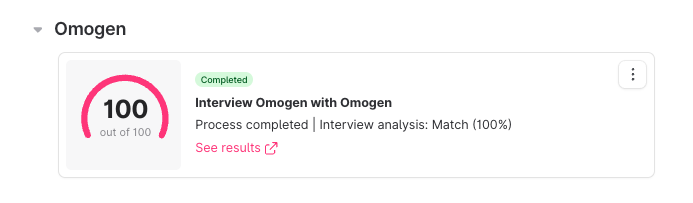
- Call answered and interview completed
- All required criteria validated
In the Teamtailor report (candidate profile):
- Process = "Complete"
- Interview analysis = "Match"
❓ Other Candidates
These candidates remain at the "Omogen Interview" stage.
3 possible cases:
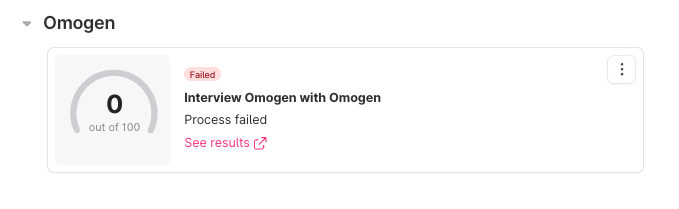
- No successful call
- Process = "Failed"
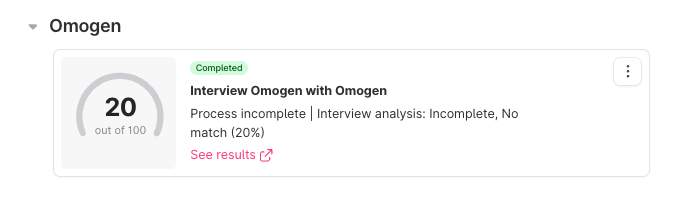
- Call answered, interview interrupted
- Process = "Incomplete"
- Interview analysis = "Incomplete, no-match"
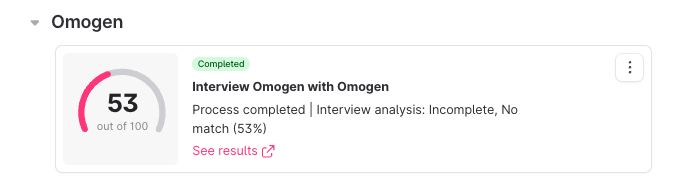
- Interview completed, criteria not validated
- Process = "Complete"
- Interview analysis = "No-match"
Omogen and Your Candidates
Our AI agent is available 24/7.
If a Candidate Wants to Call the AI Agent Back
3 possible cases:
The candidate calls back because they could not answer during the initial call — They can call the agent back at any time. The AI identifies the candidate by their number and conducts the correct interview.
The candidate had to interrupt their interview partway through — They can call the agent back at any time. The AI resumes the interview where it left off.
The candidate has already completed a full interview — If they try to call back, they will reach a voicemail indicating that their application is being processed.
⚠️ If the candidate calls back from a different number than the one the AI originally tried to reach them on, their call will fail.
Best Practices
1. Publish a detailed job posting
- Key skills required
- Required diplomas or certifications
- Required years of experience
- Contract conditions: part-time/full-time, fixed-term/permanent/temporary, schedule, salary
The more detailed the posting, the more relevant the questions asked to candidates and the analysis of their answers will be.
2. Use Omogen's recommendations as a guide, not a verdict
- Omogen helps you prioritize but lets you decide
- Omogen surfaces data points that recruiters can use for the next stages of the process
- Omogen will never automatically reject a candidate
3. Create a daily routine
- Take 20 minutes per day to process the candidates evaluated by Omogen
- Prioritize candidates identified as "matches": they are automatically moved to the "Pre-selected by Omogen" stage in Teamtailor
- Review candidates remaining at the "Omogen Interview" stage
Support & Resources
- Full tutorial — Omogen in Teamtailor: share.descript.com
- Omogen FAQ: see the FAQ & Support section
Contact your dedicated Customer Manager at any time for any questions.
Last updated: 2026-03-16